
Adding modules and inverters: PAN files and OND files
It is simple to add specific modules and inverters to Glint for use in your PV profiles and quick application to designs.
How to add PAN files
- Click on Menu in the left side panel.
- Click on PV configuration.
- Click on the Panels tab.
- Select the PAN file to upload.
- Click Save as new panel at the bottom of the window and enter the name for that panel.
How to add OND files
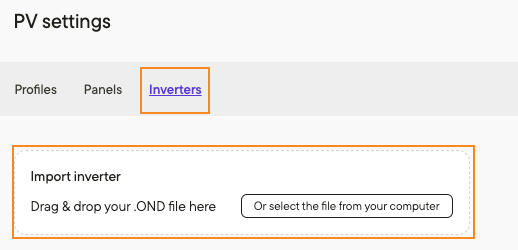
Under the Inverters tab in PV settings, repeat the process described above for adding PAN files.
PAN files
A PAN file typically refers to a performance analysis file containing data on the electrical performance of individual solar panels. It includes information such as voltage, current, and power output, which is crucial for evaluating the efficiency and reliability of PV panels in solar installations. Suppliers provide these files and ideally they should be certified by a known testing organization.
It is possible to add Heterojunction (HJT) panels to Glint — both through importing panels and manually entering the values.
OND Files
An OND file typically contains operational data and notifications related to the performance of inverters within a solar power system. It includes information such as power output, efficiency, error codes, warnings, and other diagnostic data collected from the equipment. OND files are often used for monitoring, analysis, and troubleshooting purposes by solar power system operators, maintenance personnel, or service providers.
Additional resources
Find out more about PV modules, PAN files, inverters and more components of a PV park here.
Take a look at how you can use layers, filters and PV profiles to design in a click here.