Glint Solar product updates
October 2026
Performance Ratio in PV Analysis reports
Date: October 27, 2026
Change size: #Small
When you run a new PV analysis, Performance Ratio will be in the report, in the performance section. If you've activated the bifacial option, you'll also see a bifacial PR value.
The new map export is now available as a beta
Date: October 27, 2026
Change size: #Medium
Everyone can now try the new map export (V2) in Glint. The current export stays the default, so nothing changes until you switch it on, and you can switch back any time.
How to try it
- Right-click the map and choose Export map view
- Turn on Try the new map export · Beta in the top right
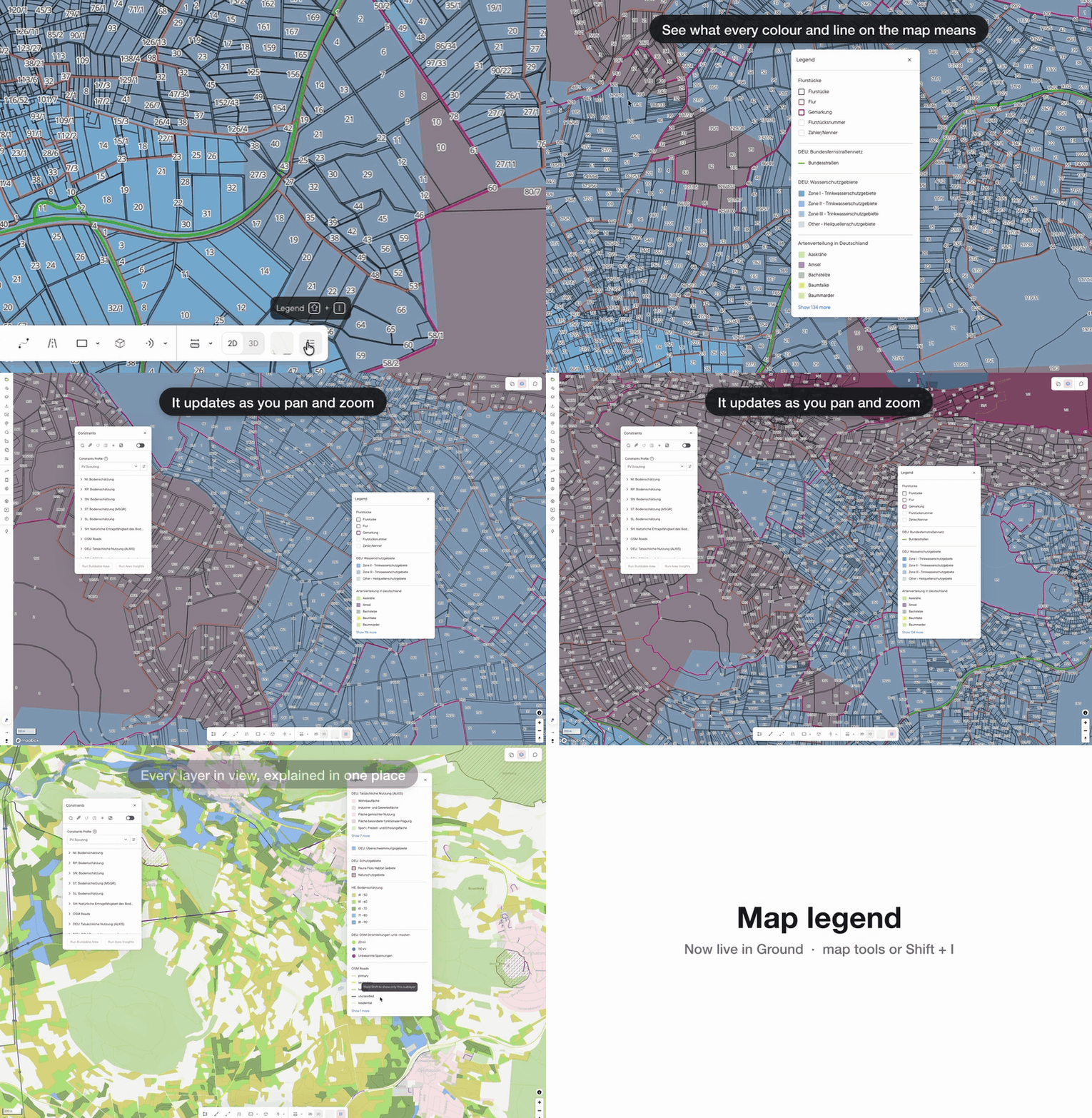
Map legend and constraint layer preview
Date: October 21, 2026
Change size: #Medium
Map legend: See what the colours and symbols on your map mean, without leaving the map. Open it with the new Legend button in the map tools, or press Shift+I.
See which layers a constraint profile uses
• In the Constraints window, hold Shift with your mouse over the window to show only the layers your constraint profile uses. Hover a single constraint to narrow it to just that one. Let go of Shift and your map is back to how it was.
• To keep that view, click the new :map: See constraint layers in the map button next to "Add constraint". It turns on the profile's layers and turns everything else off.
Viewshed analysis in France and Luxembourg
Date: October 20, 2026
Change size: #Medium
Geographic Availability: France 🇫🇷 and Luxembourg 🇱🇺
Analyze where your project can be seen from. Right click an object, choose height of object and observer, and any obstacles to include in the analysis. The analysis shows where object can be seen from. The analysis takes into account the obstacles you include as well as the elevation, it does not take into account buildings or forest in the basemap unless you specifically add 3D structures to represent them.
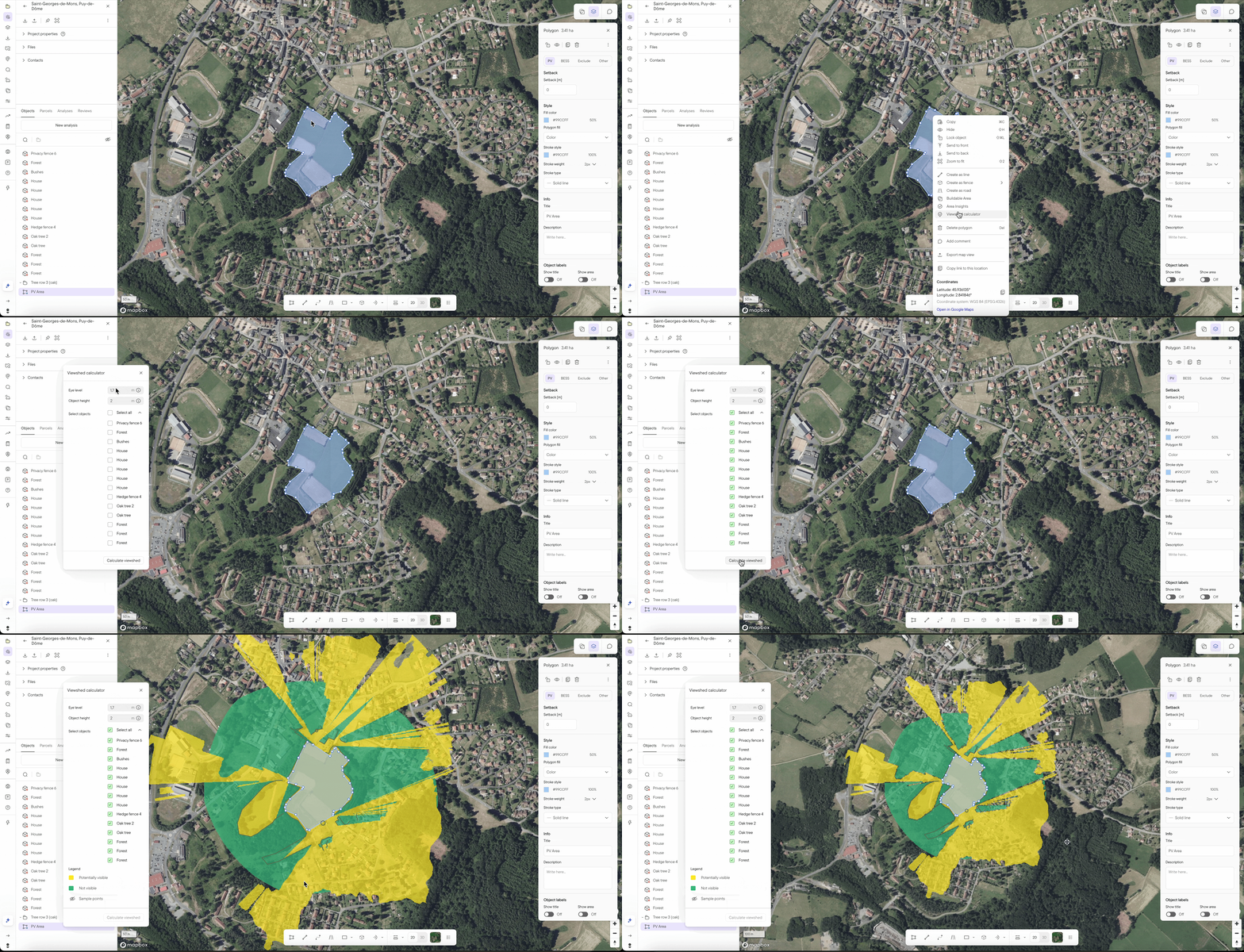
Chart values now included in PDF exports
Date: October 14, 2026
Change size: #Small
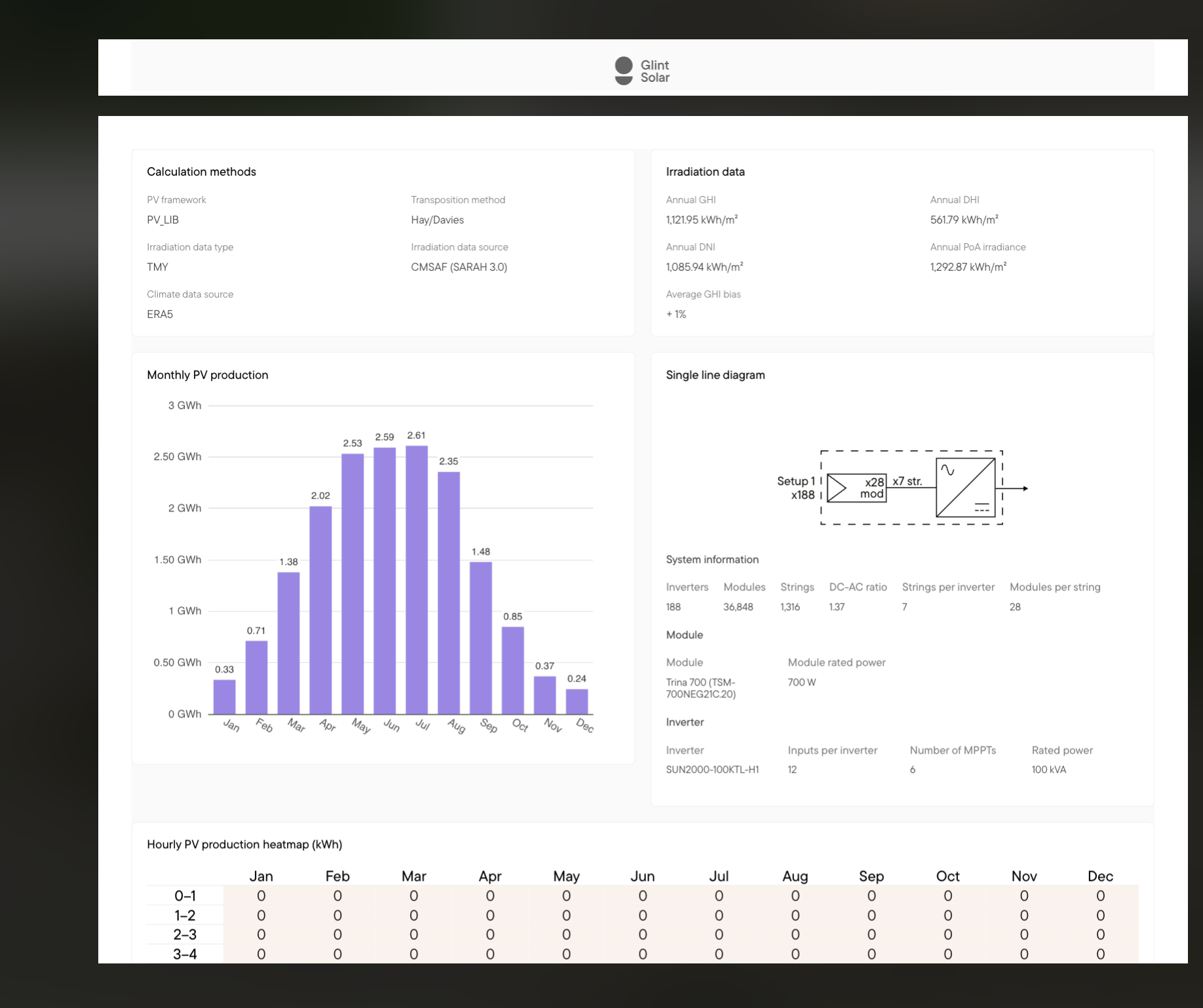
Until now the numerical values could only be seen through interactive chart elements in the product. Now the values are included in the exported reports, making it easier to review detailed insights.
Glint AI gets prospecting agent 🤖
Date: October 14, 2026
Change size: #Medium
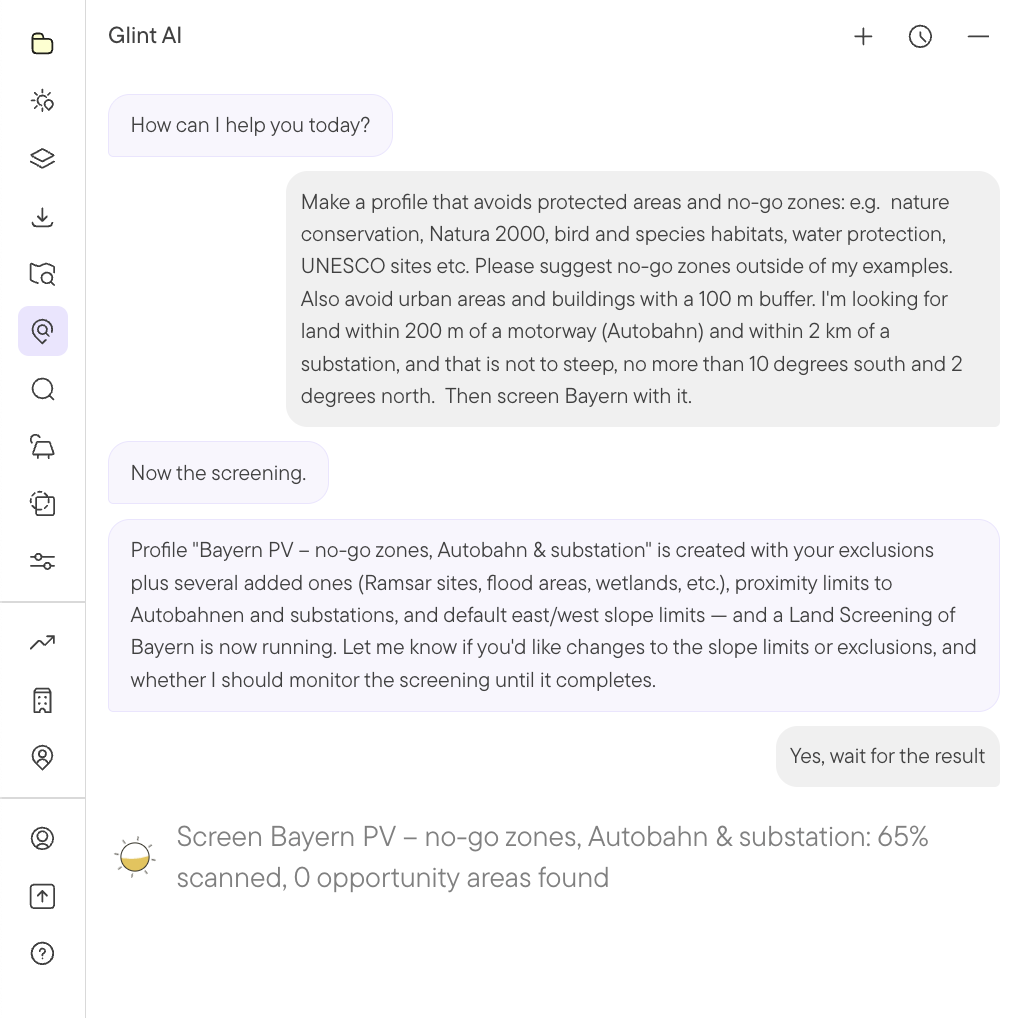
Describe what kind of site you are looking for in plain language, and Glint AI sets up the constraints and runs the search: “Make a profile that avoids protected areas and forest, keeps 500 m from homes, slope under 10°, stays within 200m of autobahn and within 1000m of substations, then screen Bavaria.” You can also use it to discover and organize layers from the Glint Layer Library.
The agent can use use the following tools:
- Parcel search
- Land screening (for subscribers)
- Constraint profiles
- Buildable Area and Area Insights
- Layers and the Map
Parcel table export now includes contacts and comments
Date: October 9, 2026
Change size: #Small
Now the contacts and comments you add to parcels in Glint Solar are included in the export to Excel. This way you can keep the entire thread of the project when handing it over to your field team, contractors etc. The contact info and every comment are neatly organized in sheets.
Bulk update and other imporovements in contact table
Date: October 9, 2026
Change size: #Small
The contact table now has sae fionality as the projects table. This includes bulk update, bulk delete, filtering, sorting, editable rows, column hiding.
Editable columns in imported layers
Date: October 1, 2026
Change size: #Small
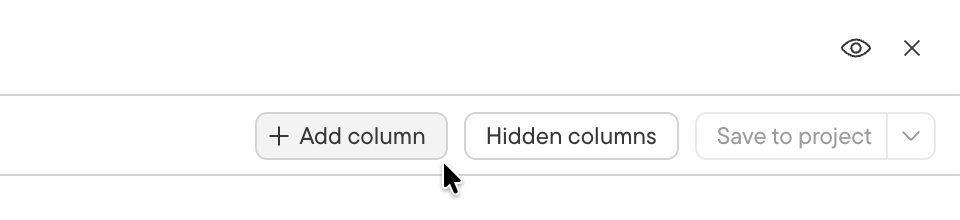
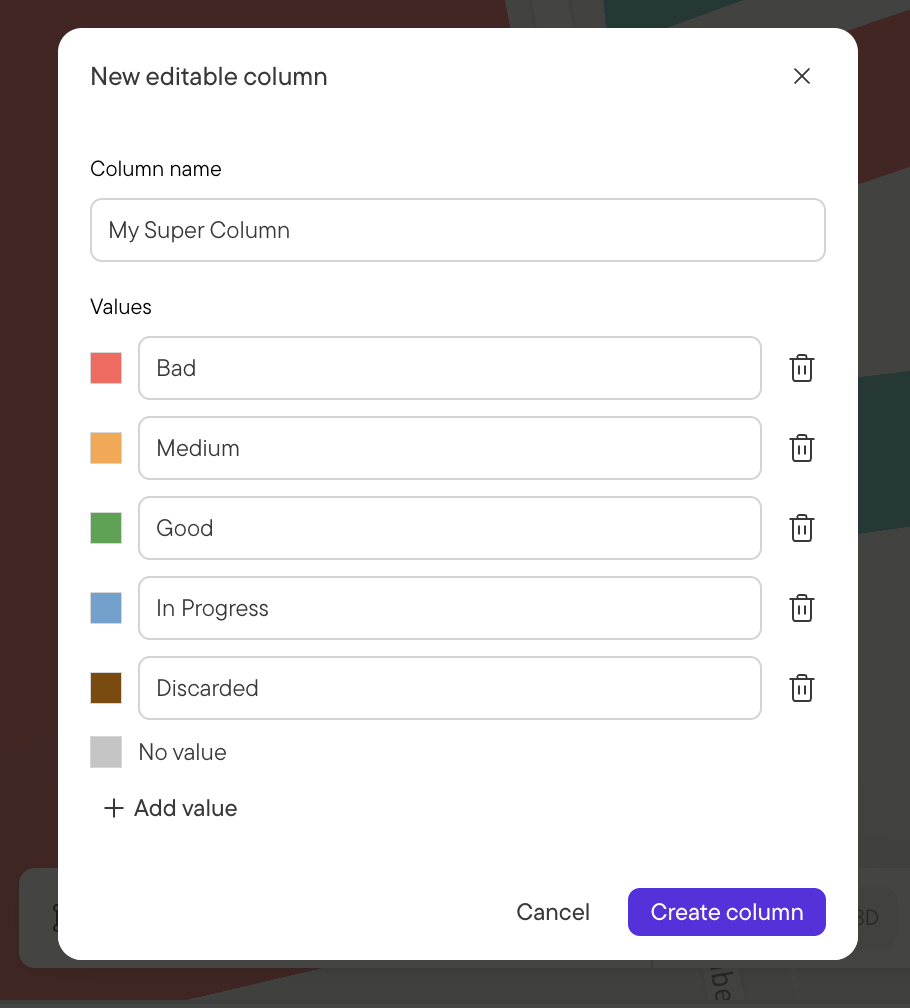
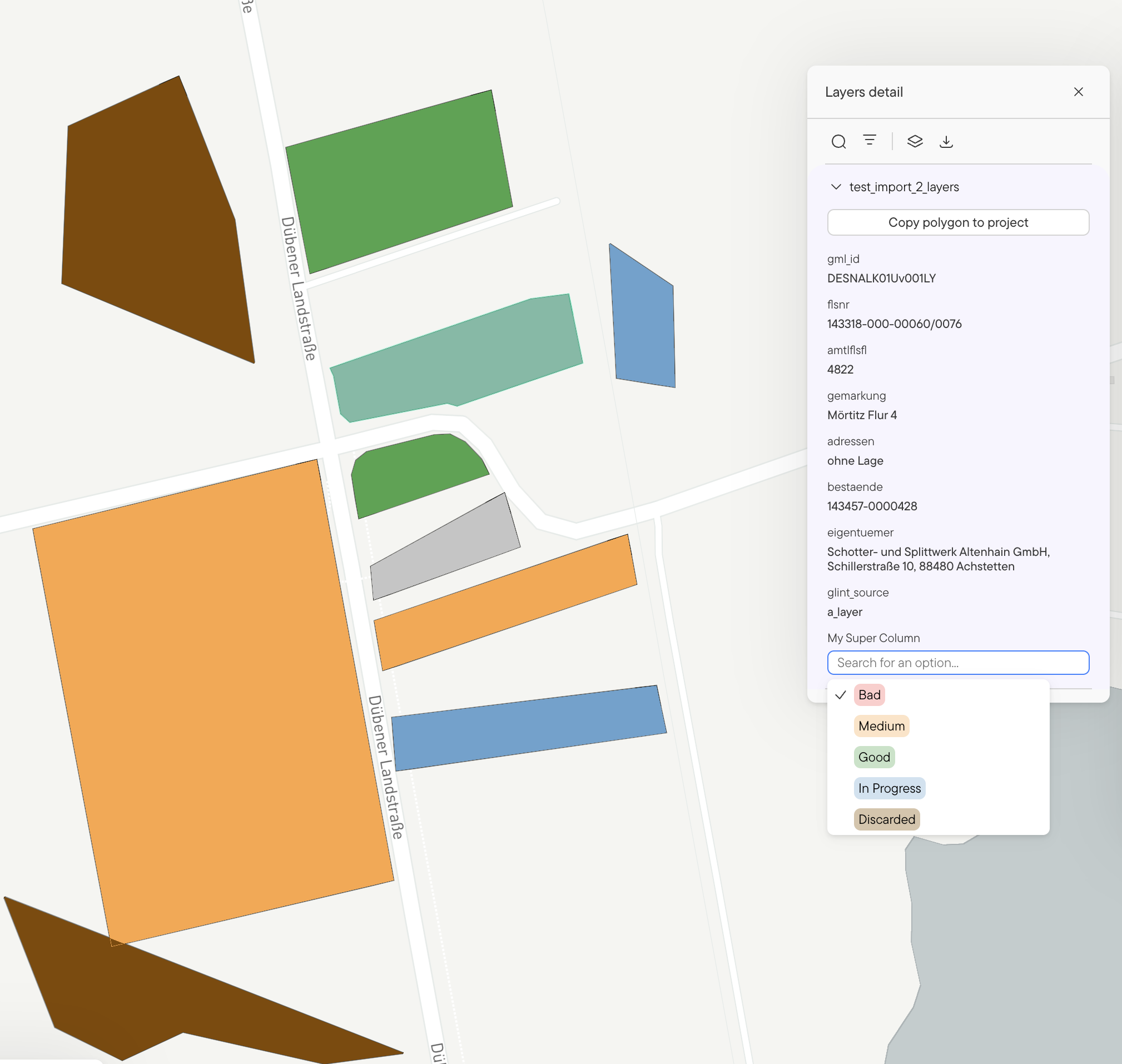
It is now possible to add an editable Select column/attribute to any imported layer. If you get a layer with potential sites to evaluate, you can use this to keep of which sites have been evaluated. You can edit the values in the layer table, or by clicking the object in the map.
How: Open the imported layer as table. Click "Add column", decide on what values can be shown and click "Create column"
September 2026
Contact page design improvements
Date: September 30, 2026
Change size: #Small
We heard from several customers that the table view for projects worked better than the one on contacts. We listened, and upgraded the contacts page so they both work the same. Faster bulk editions. Faster changes to data. Consistent experience. While we were tinkering on the page we also added a column for recent activity so you can easily see when a contact was last edited or commented on.

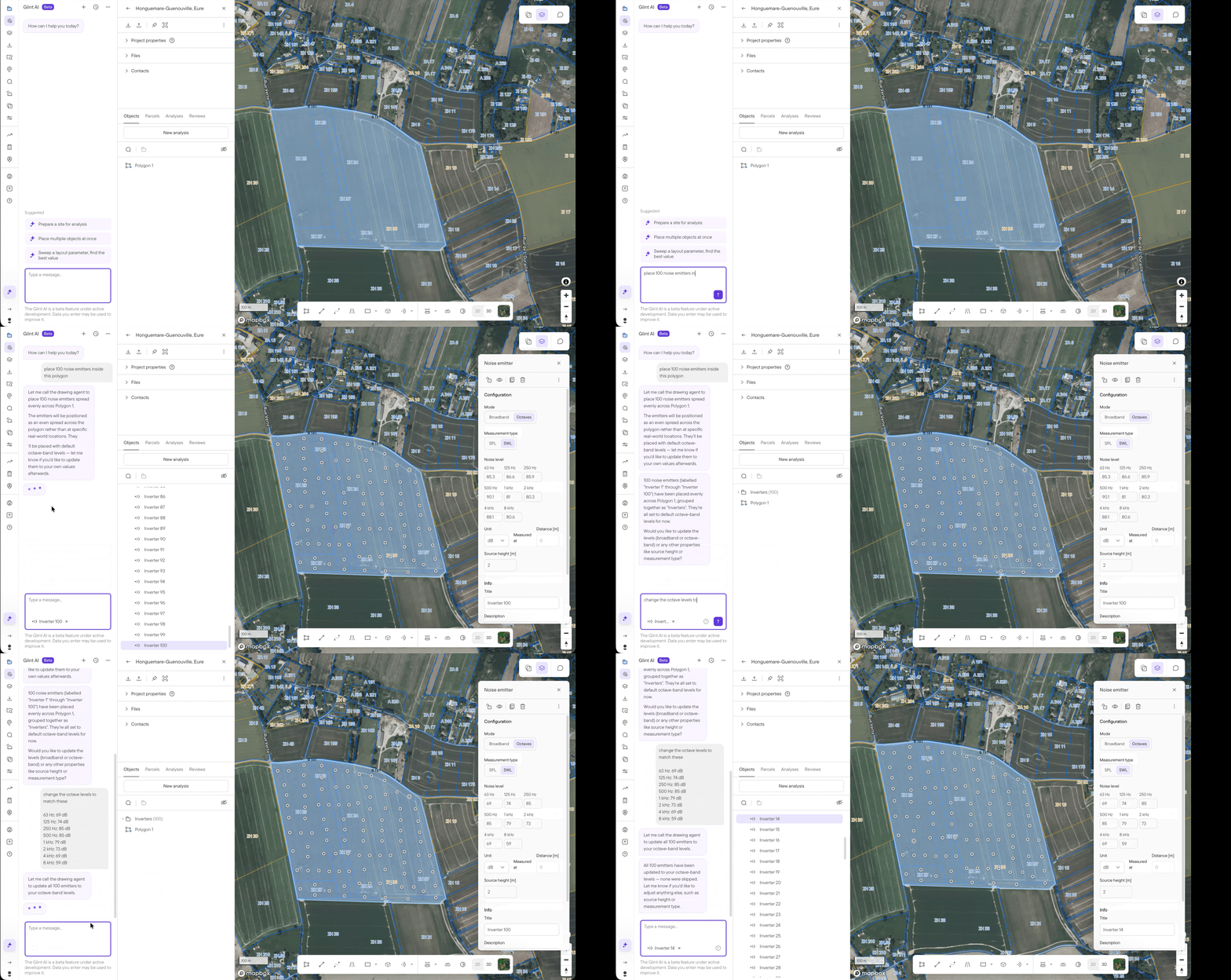
Glint AI can now place Noise emitters
Date: September 23, 2026
Change size: #Small
Placing or updating noise emitter can be tediuous and time consuming, now Glint AI can take care of it for you.
Export contacts
Date: September 23, 2026
Change size: #Small
You can now export all your contacts from your company contacts base in Glint Solar. This makes it easier to bring your list elsewhere as well as enriching it with properties from other sources, so you can bring a richer list back into Glint later.
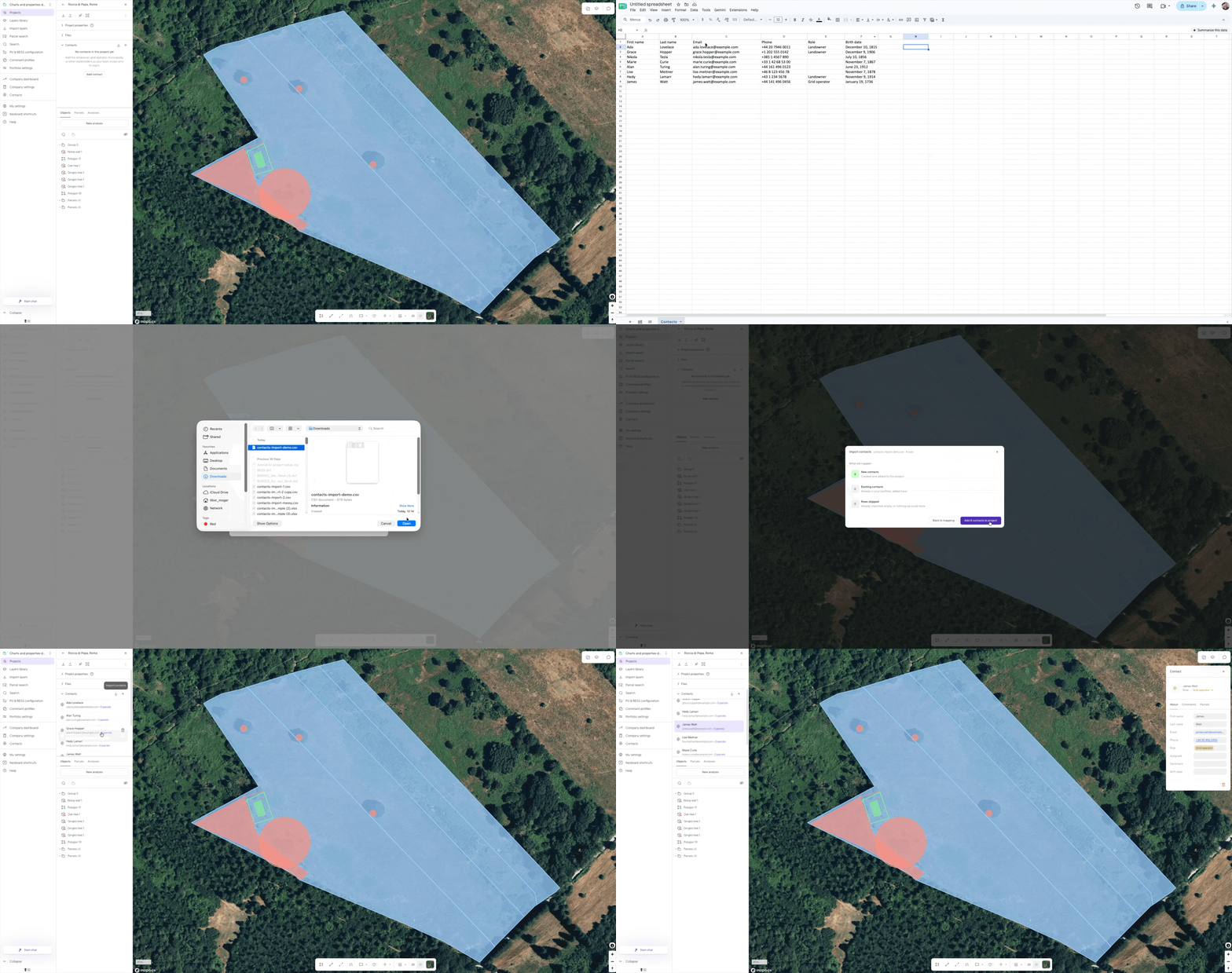
Import contacts from CSV or Excel
Date: September 14, 2026
Change size: #Medium
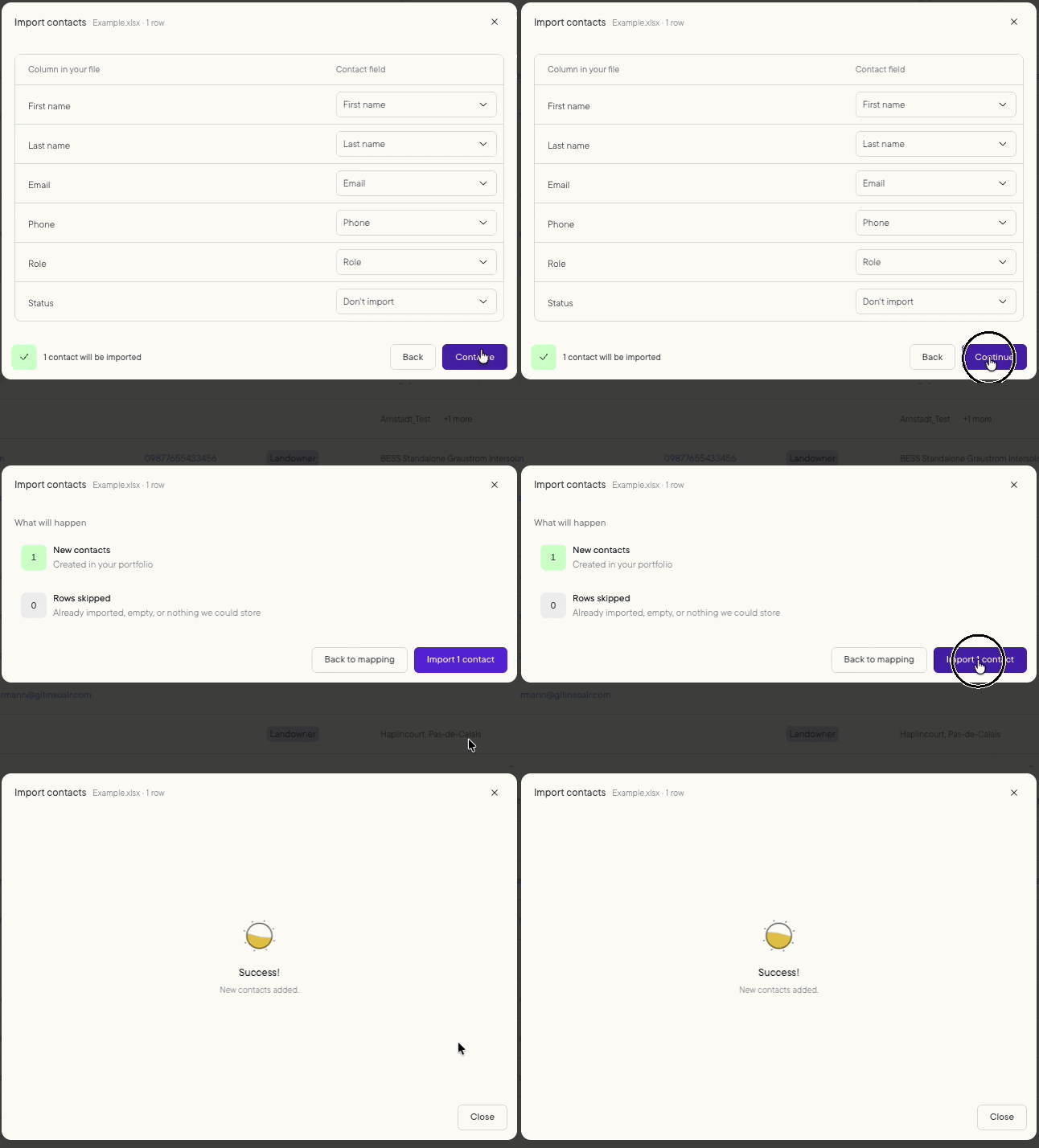
It is now possible to import contacts from CSV or Excel. Note, there is no automatic matching with parcels, only contacts gets imported.
Copy link to location
Date: September 14, 2026
Change size: #Small
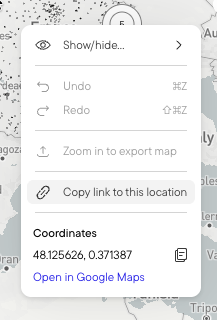
It is now possible to share Glint links to specific locations.
e.g.: https://app.glintsolar.com/ground?coord=44.335116%2C1.208799&zoom=14.24
This makes it possible to share locations on email or similar, or paste specific locations into other tools used by the team. You access this by right clicking in the map the location you want to share .
Import contacts
Date: September 14, 2026
Change size: #Small
It is now possible to import contacts in bulk with CSV or Excel files. You can do this both to your company or to a specific project.
August 2026
Farmeable Area
Date: Aug 31. 2026.
Change size: #Medium
Geographic Availability: France 🇫🇷 and Italy 🇮🇹
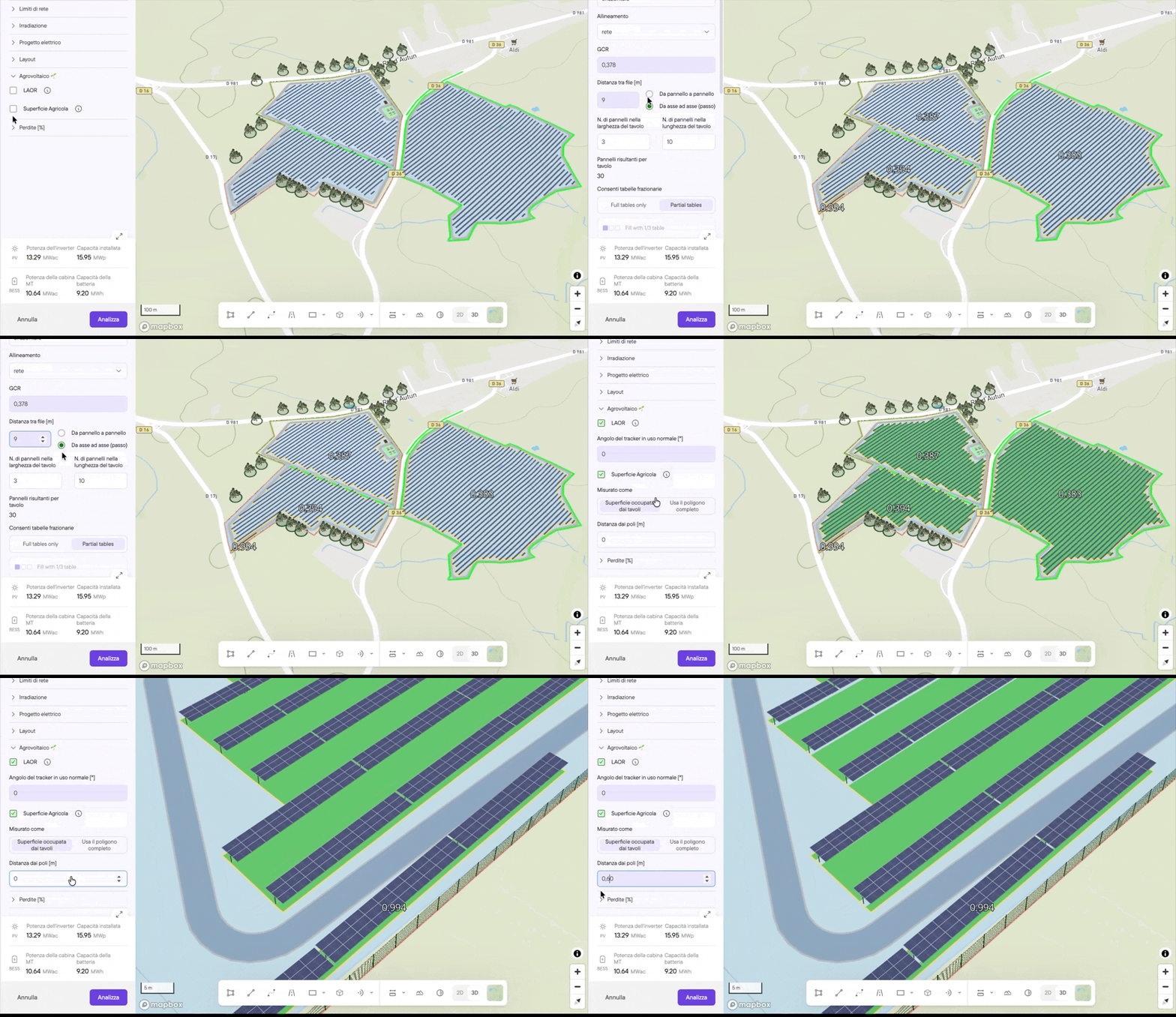
You can now calculate how much ground in your layout stays usable for crops, grazing or machinery once the clearance around the poles and the footprint of any other site infrastructure, such as access roads, substations and technical buildings, are removed.
How to use it: In the new analysis side bar, open the Agrovoiltaics section. Click farmeable area. Define the clearance from your poles. And select whether you want to use the full PV polygon or just the table area. The farmable area result will appear in your Analysis report, under geography. This is also available per polygon, using custom PV polygons.
Land Screening
Date: Aug 20. 2026.
Change size: #Large
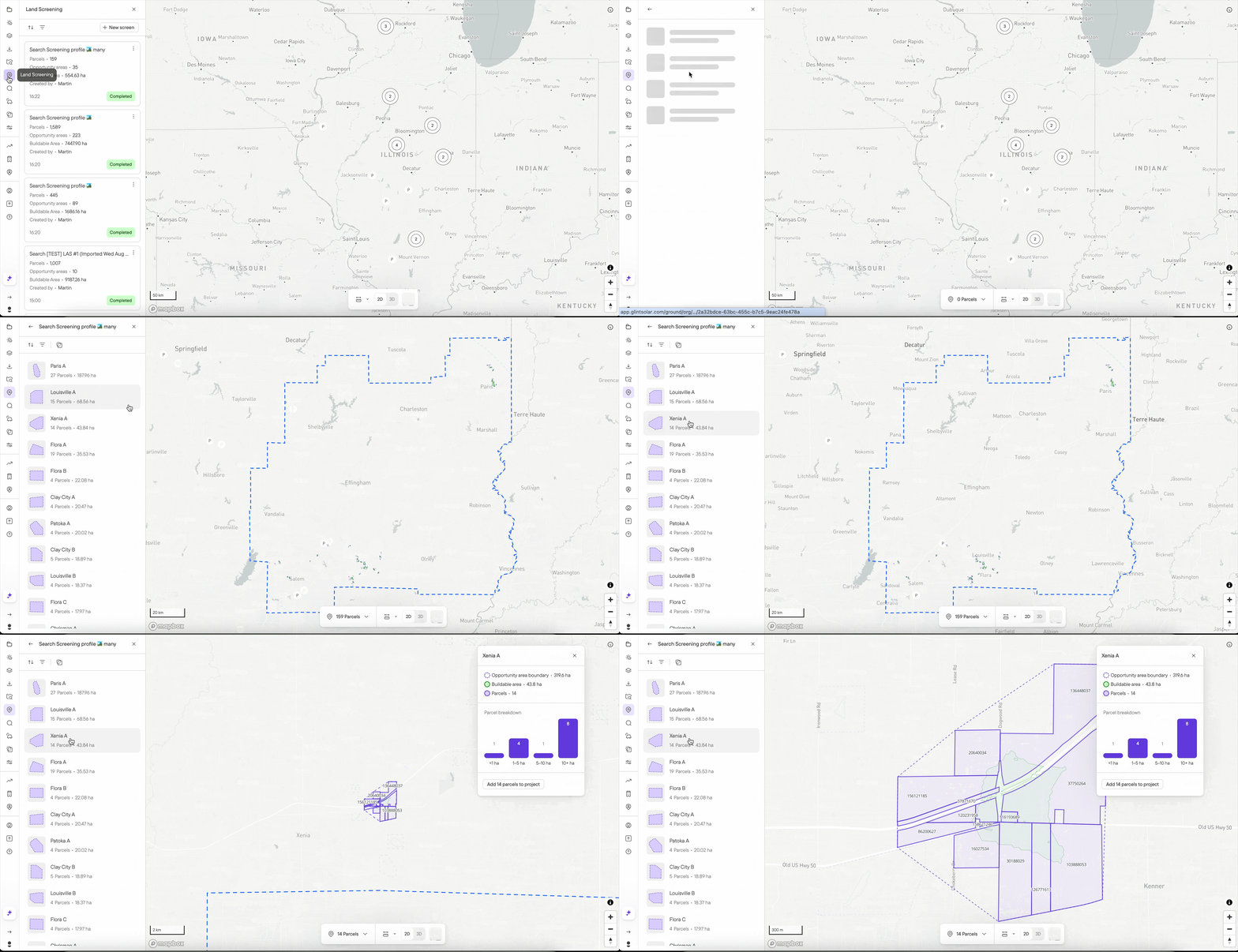
Land Screening lets you sweep a large area, such as a US state or a medium-sized European country, in one go, so you have a better chance of finding sites that fit. The search runs on your existing constraint profiles. A search returns a list of opportunity areas that you can sort and filter. Each opportunity area shows its buildable area, and so does every parcel within it, so you can rank on what is actually developable rather than on total size. You can investigate each one, then take the whole area or just the parcels you want into a project or export it to CSV.
Flexible BESS layouts
Date: Aug 19. 2026.
Change size: #Medium
It is now possible to limit to target power in Bess objects and edit/rearrange individual sets.
By default, automatic orientation is turned off. It's up to the user to use the wheel or orientation field to adjust it, or toggle on automatic orientation. You can read more here.

Queue multiple layer uploads
Date: Aug 18. 2026.
Change size: #Small
You are no longer limited to waiting for a layer upload to complete before adding another one. Uploads are now queued. You can also multi-select or drag+drop multiple files for layer upload at once.
Review DXF files in Glint (beta)
Date: Aug 14. 2026.
Change size: #Medium
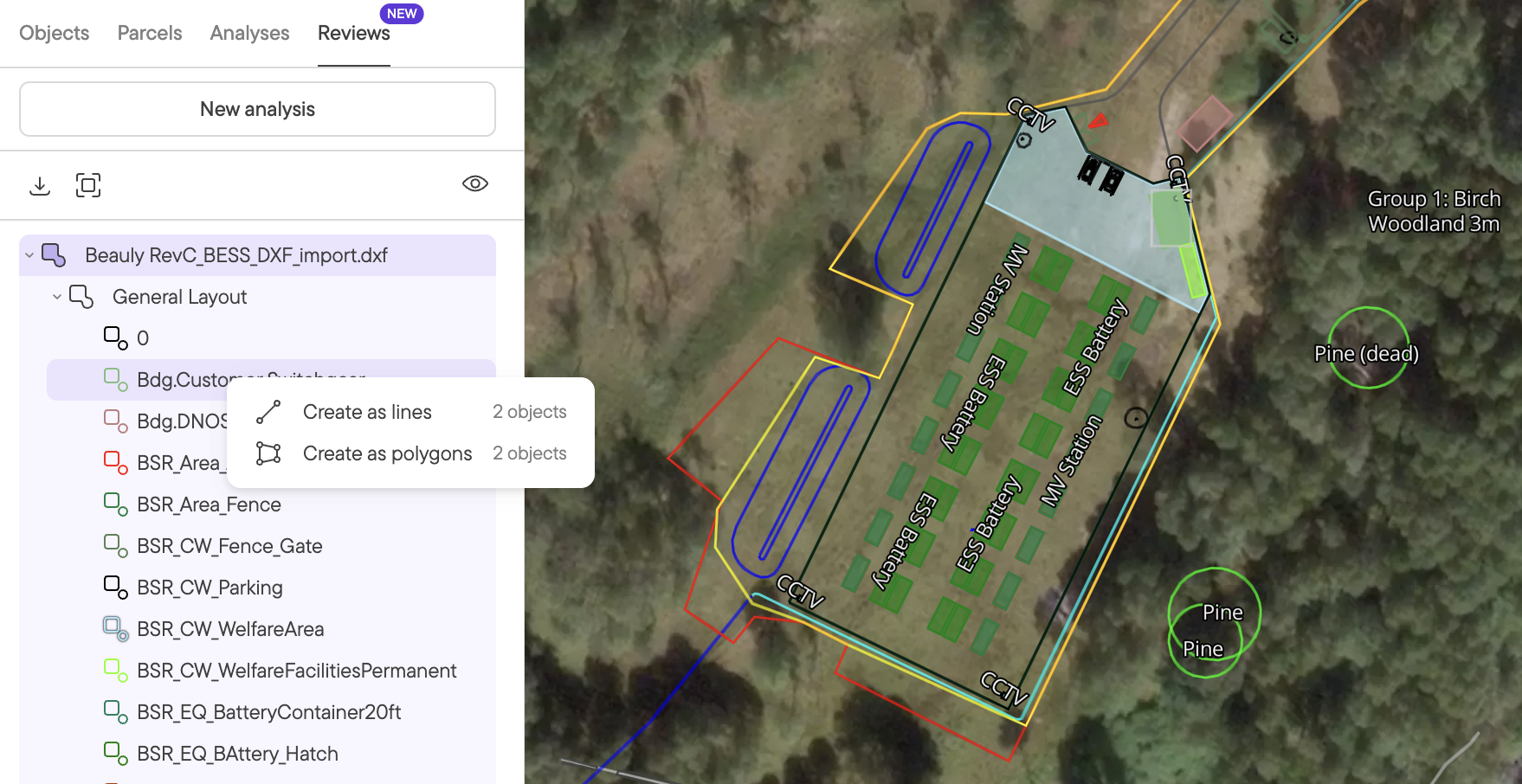
Upload a DXF into Files and you will get a new Reviews tab next to Analysis. Here you can see a full list of every layer in the file. You can also interact with each element through the map. The DXF itself is not editable, but users can copy elements to become objects by right-clicking an element and selecting line or polygon. More details in the help centre.
Patterns on polygons and lines
Date: Aug 13. 2026.
Change size: #Small
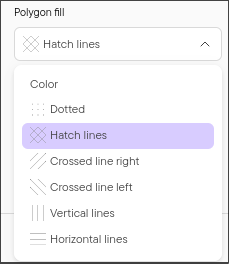
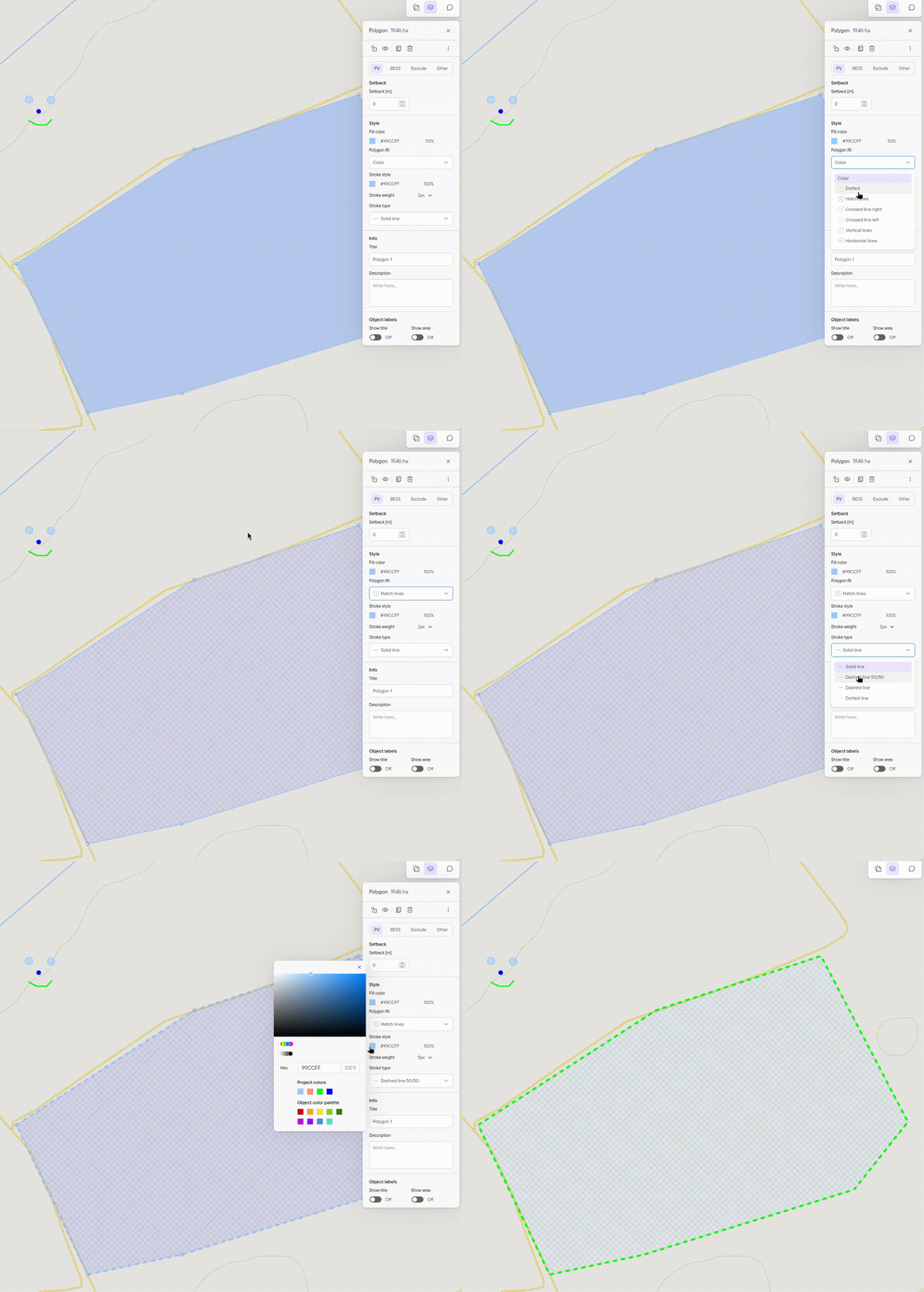
You can now set patterns on polygons and different stroke types on lines. Simply select an object, and select which pattern or stroke type you'd like. For patterns you can control opacity and color like you are used to for objects with a fill color. Note, the opacity defaults to 100% when you select a pattern. For lines you can still still choose stroke weight, color etc like before. Patterns and styles you select are reflected in map export and analysis export.
July 2026
High resolution slope available in an all US states (except Alaska) and in Puerto Rico
Date: July 24. 2026.
Change size: #Small
There is now a slope layer, and Buildable Area, Area Insights and Constraint Layer work with constraint Steepness.
The resolution is 1m resolution wherever it’s available, and we fall back to 1/9 arcsec (roughly 3m) resolution data wherever only that is available. Some areas are covered by neither of these sources.
Comment right in the map and loop in your colleagues
Date: July 10. 2026.
Change size: #Medium
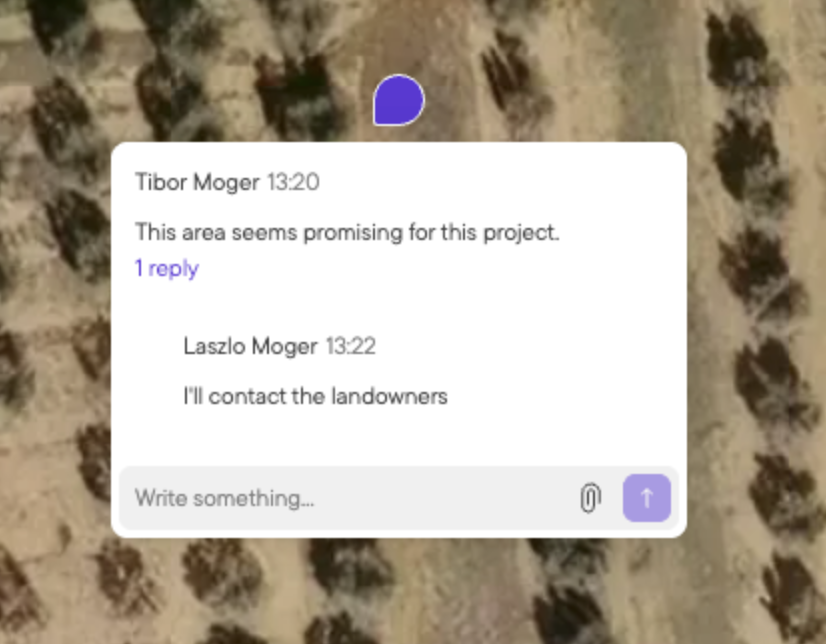
It is now easier to collaborate and get more done as a team in Glint Solar. Comments have received several upgrades this summer allowing you to
- Comment in the map e.g. to pinpoint a specific issue to deal with
- Threads allow you to respond to a comment and get to the depth of the issue
- Mention people with @ followed by their name to bring anyone in your portfolio right into a comment. Mentions will trigger an email notification to the person so they know to follow up.
June 2026
BESS Single Line Diagram
Date: June 11. 2026.
Change size: #Small
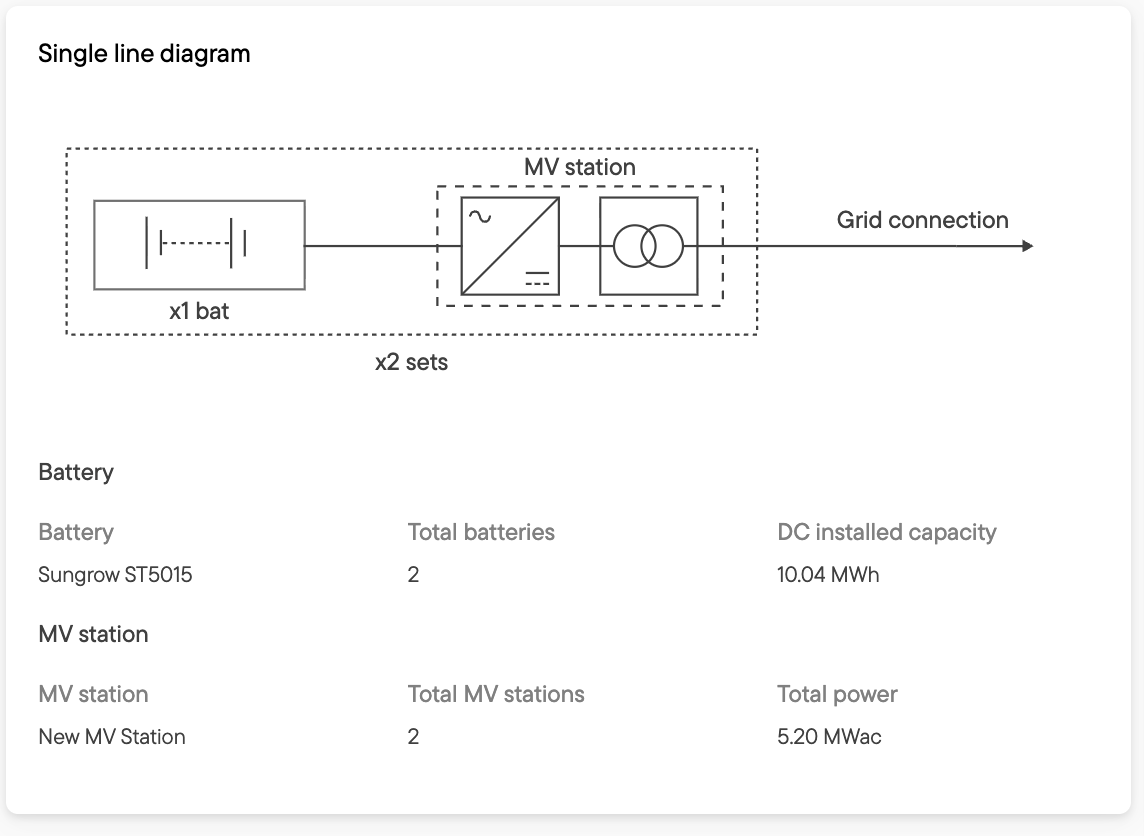
BESS Reports now include a Single Line Diagram, just like their PV counterpart. This gives you a summary of your BESS project's electrical components, and serves as a foundation for your Engineering counterpart to build a more detailed SLD from.
Comments: now it's possible to export comments
Date: June 8. 2026.
Change size: #Small
Now you are able to export comments for projects, parcels and contacts to a single file in the Excel (.xlsx) format. Whether you need a transcript about a landowner or area, or extract issues to address elsewhere, exporting comments helps you there.
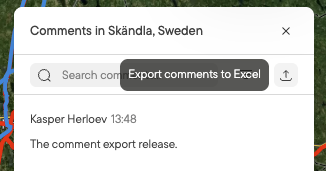
Available through the project-level comments view in the upper right part of your screen in Glint right now.
API support for Parcels and Contacts
Date: June 5. 2026.
Change size: #Small
Now it is possible to use the API to syncronize data for Parcels and Contacts across systems. Say you want to keep a contact database in your CRM in sync with Glint Solar, you can now do that. You could also update a list of parcel reference ids in a project across systems enabling your field team to pick up the key information for site visits.
Leveraging the API is a technical implementation, but our team is happy to assist if you need troubleshooting. Just reach out to your Customer Success Manager for next steps.
Learn more about the API on the links below
May 2026
Command Palette: navigate the app with only the keyboard
Date: May 28. 2026.
Change size: #Small
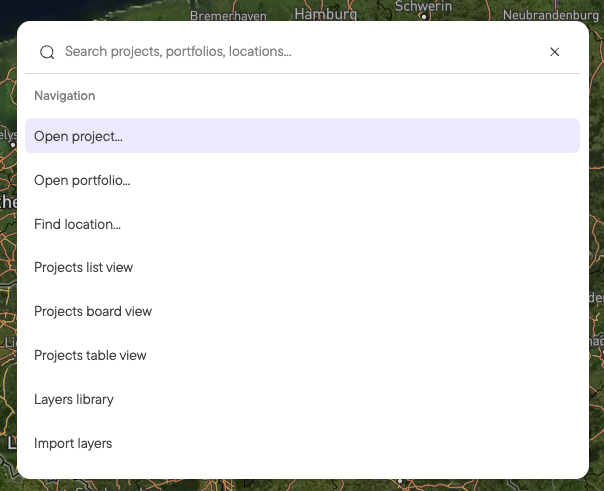
Open the Command Palette by pressing CMD/CTRL+K, use it to look up a location, switch portfolios, search trough projects, settings, portfolios, analysis and more.
Site control: Tracking landowner status and obtaining site control just got easier.
Date: May 27. 2026.
Change size: #Large
We are happy to introduce Site Control, a new suite of features to help you keep track of the process of securing control of your site and quickly understand how changes impact your layout.
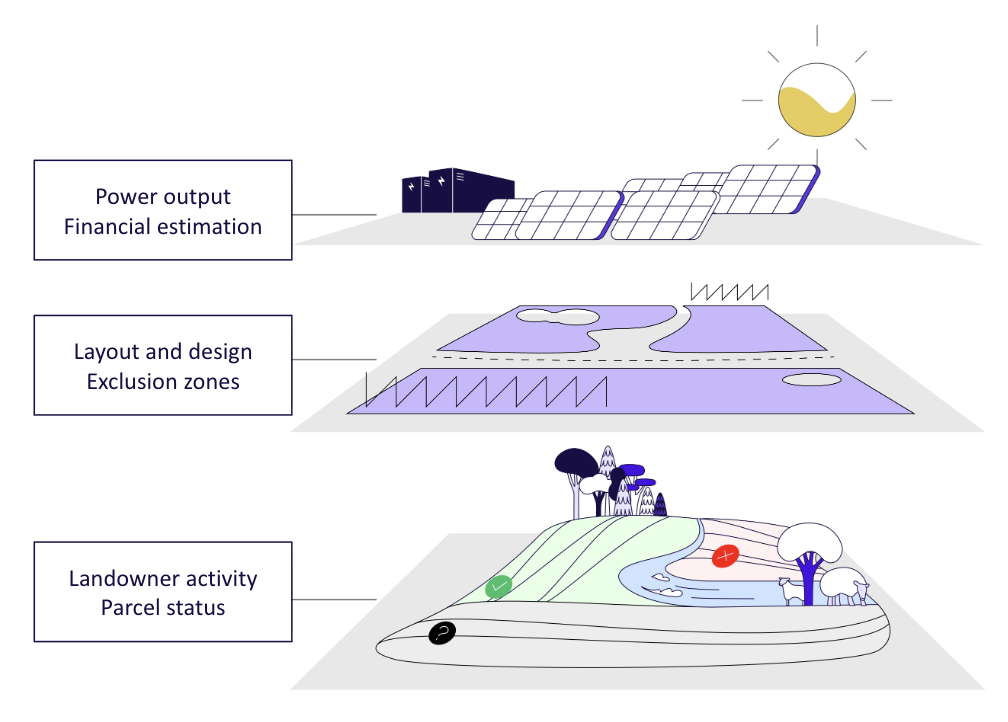
Site control includes:
- Parcels from official data registers that you enrich with negotiation status and contacts such as the landowner
- Contacts enabling you to keep track of every stakeholder with their role and contact info
- Comments can now be added to every project, parcel, and contact to keep track of events and notes
- Files can now be attached to comments to keep track of documents and photos across your project
Learn more about how to use the new set of features here.
April 2026
Constraint Layer: Visualize your constraint profile as a layer
Date: April 27. 2026.
Change size: #Medium
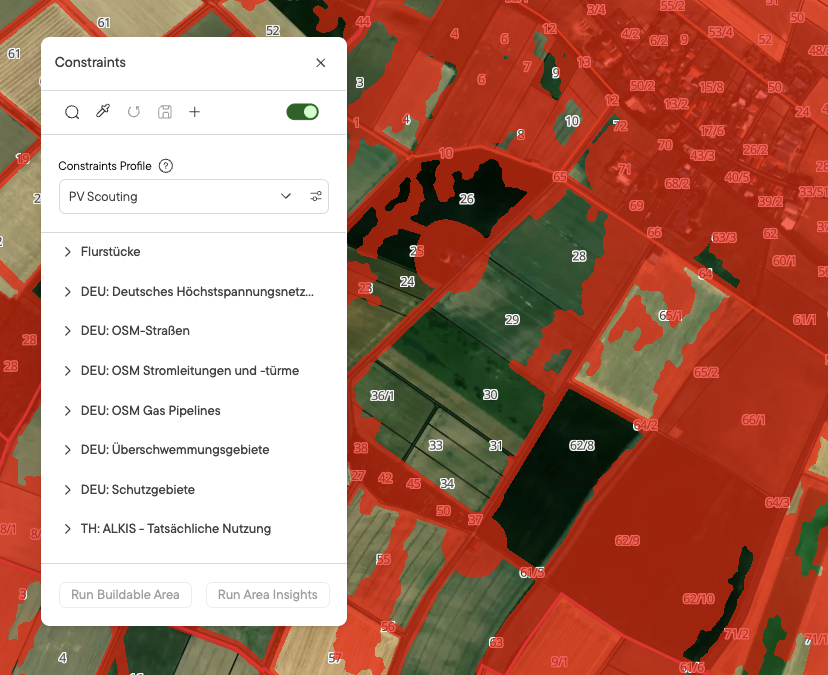
Applying your constraint profiles as a layer lets you instantly see how all your constraints combine to affect a given area — so you can be confident you're not designing a project that would fail your predefined restrictions. You can switch between the constraint profiles you and your team have created, letting you test multiple combinations of constraints in seconds.
Relevant Layers: Make sure you haven't forgotten any important layers
Date: April 27. 2026.
Change size: #Medium
When viewing the layers on the map, click the "In view" tab to see every layer with any geometry overlapping the area you're currently viewing. This means you can be confident you've checked all the layers that intersect your site — even ones you haven't added to your favourites.
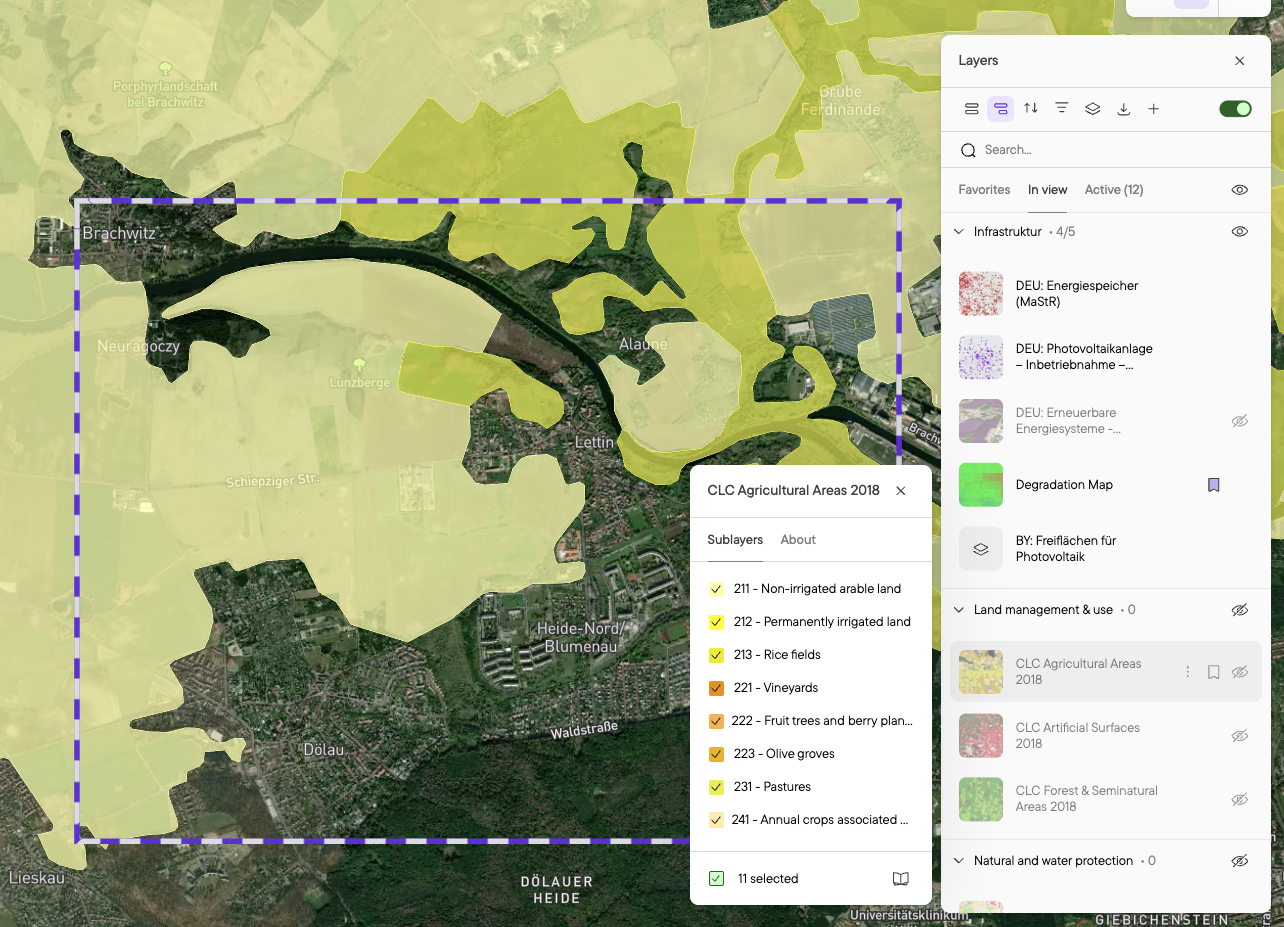
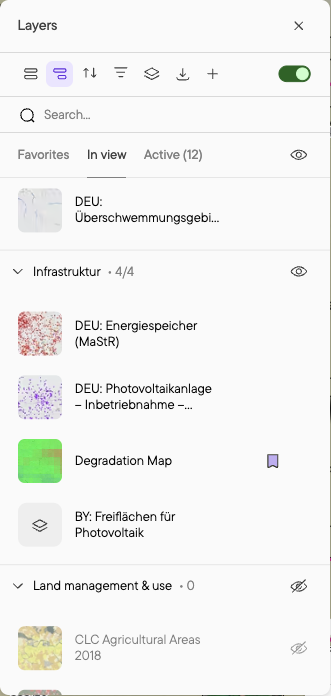
We've also added a quick-view option. Hold Shift while hovering over a layer in the list to turn that layer on and all others off, so you can view a single layer in isolation without manually toggling the rest. This lets you evaluate dozens of layers in seconds.
Hybrid Analysis: Evaluate PV-BESS Hybrid sites in Glint Solar
Date: April 14. 2026.
Change size: #Large
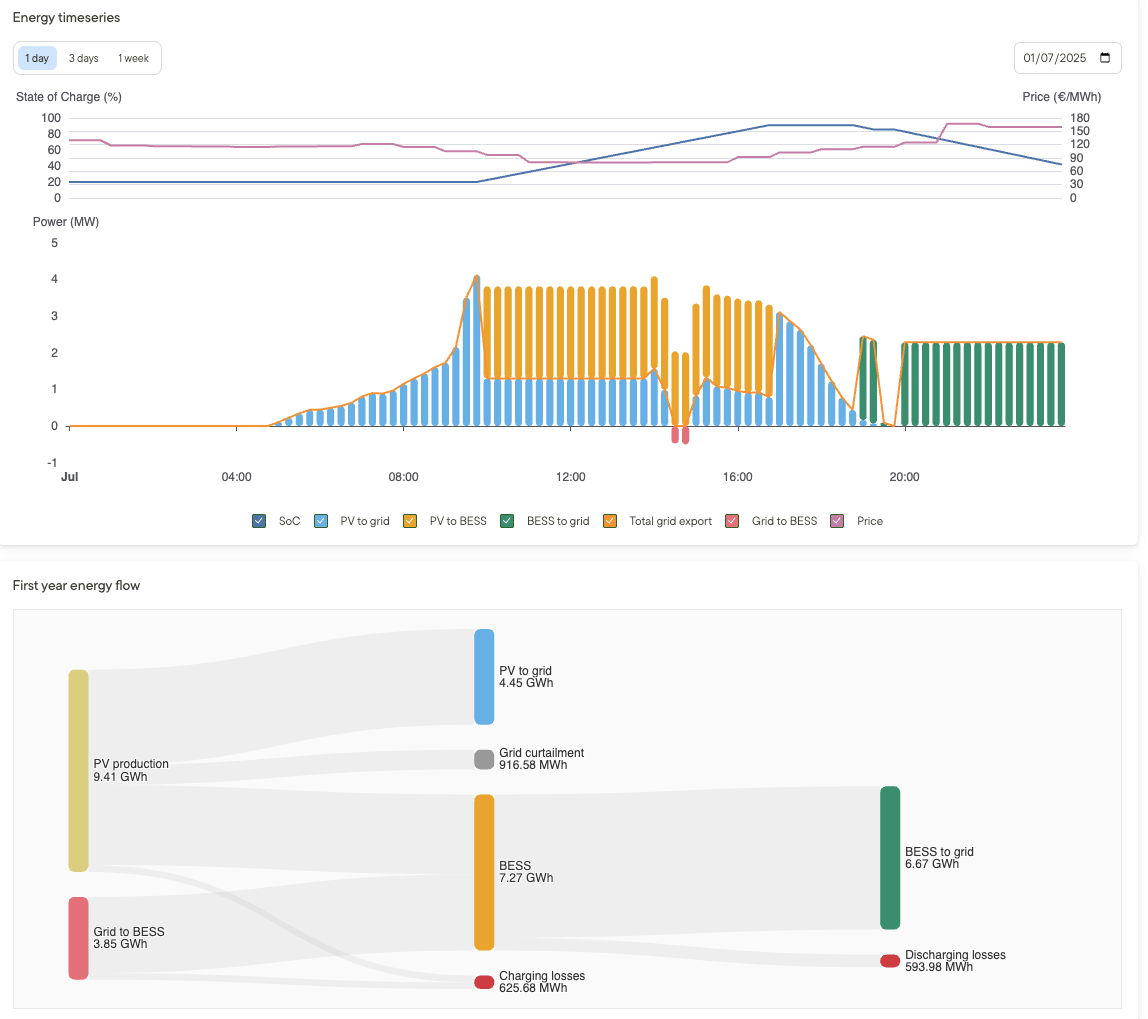
Design a hybrid PV-BESS site in Glint Solar. Configure your BESS dispatching to allow for batteries to charge from curtailed PV production, or from the grid. Understand how both systems interact together.
For a full guide, visit this page.
March 2026
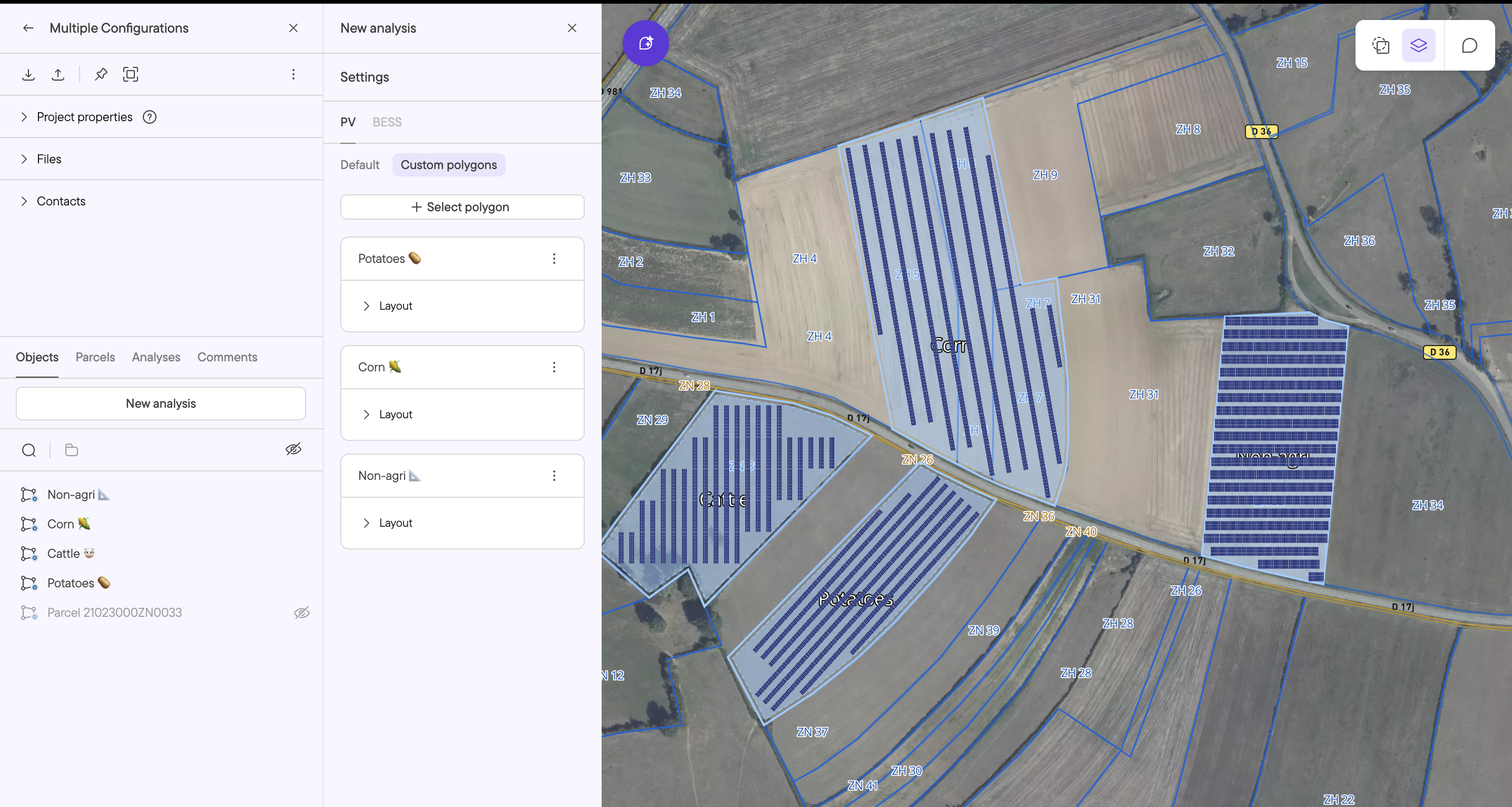
Multiple PV layouts: Configure different PV areas in one Design
Date: March 3. 2026.
Change size: #Medium
We've heard this one for a while, and it's finally here! You can now configure different PV layouts for different zones within a single PV analysis. Each polygon in your project can have its own row spacing, tilt, azimuth, etc. making it easier to model agri-PV sites with varying crop requirements or complex geometries where azimuth varies by zone. The result is more accurate yield calculations and financial projections, without the workaround of running separate analyses per zone.