
Create and edit portfolios
As a growing solar company, you may want to organize your projects into different portfolios. You can now create and arrange portfolios however you want—by geography, team, size, or any other characteristic. We're giving you the flexibility you need!
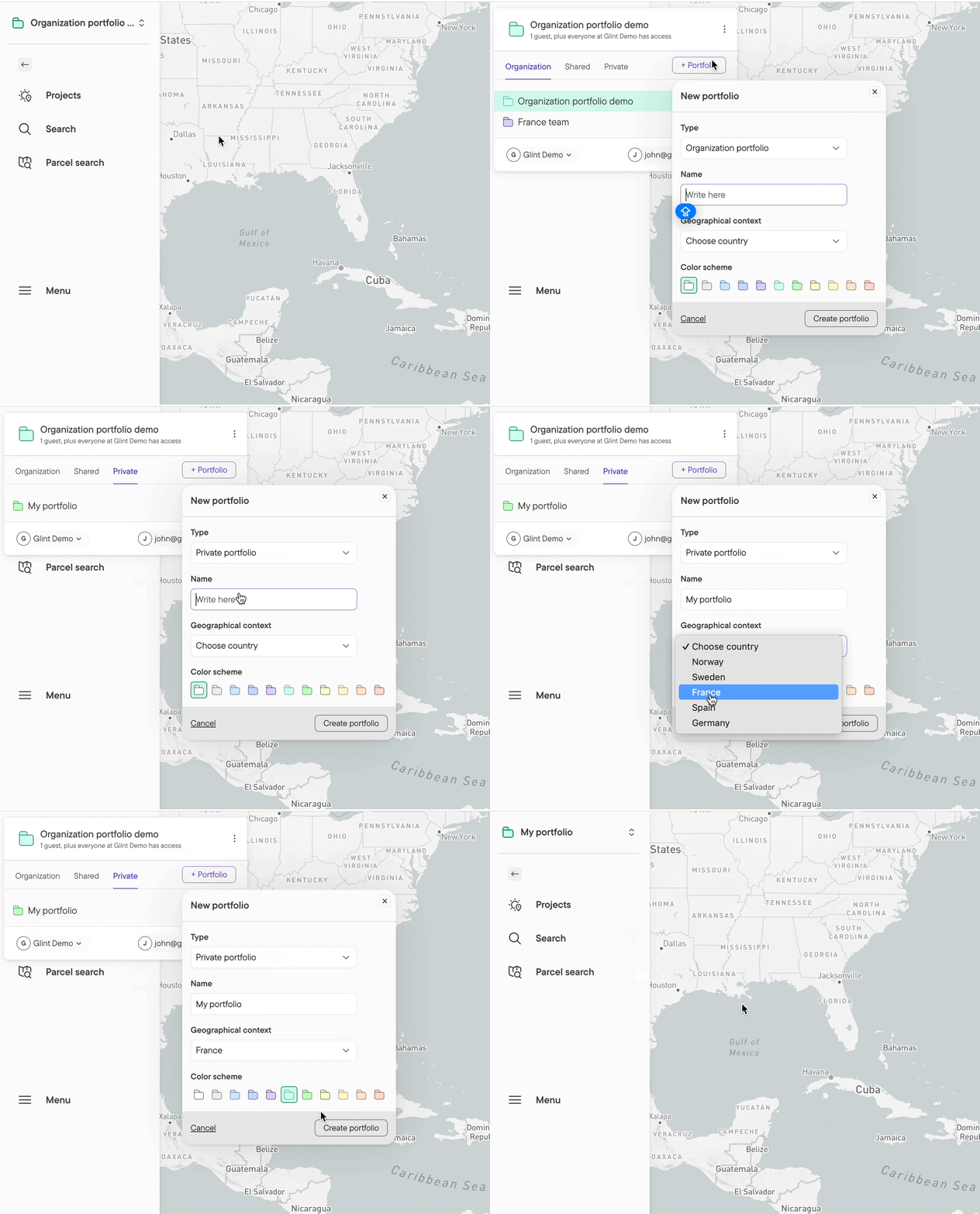
How
- Open the portfolio list in the upper left corner of the screen and click on +Portfolio to create a new portfolio
- Give your new portfolio a name, geographical context (for country data), and a color
- You can make it an organization portfolio (available to everyone who is an organization member/admin) or a private portfolio (available only to you)
Portfolio settings
In the Portfolio settings you can:
- Select the country data available in your portfolio.
- Invite new users to your portfolio.
- Adjust access for users in your portfolio.
- Select the coordinate system used in Map Exports.
- Add a logo to be used in reports.
Additional resources
The How to invite users and the Project portfolio overview articles are also great places to start for learning the basics of collaboration in Glint Solar.